
Ham radio has a surprisingly rich content ecosystem. There are blogs covering DX expeditions and technical topics, podcasts perfect for the commute, and YouTube channels with tutorials, reviews, and operating demonstrations. The problem isn’t that the content isn’t out there — it’s that it’s scattered across a dozen different sites, and keeping up with all of it means either spending half your operating time clicking through bookmarks or missing things entirely.
I’ve had the experience of finding out about a DX expedition after it was already over, or discovering a podcast episode that would have been useful before a contest two weeks after it aired. A folder of bookmarks you mean to check regularly is not the same as actually checking them regularly. What I wanted was one place where everything shows up automatically — blogs, podcasts, and videos — without any clicking around.
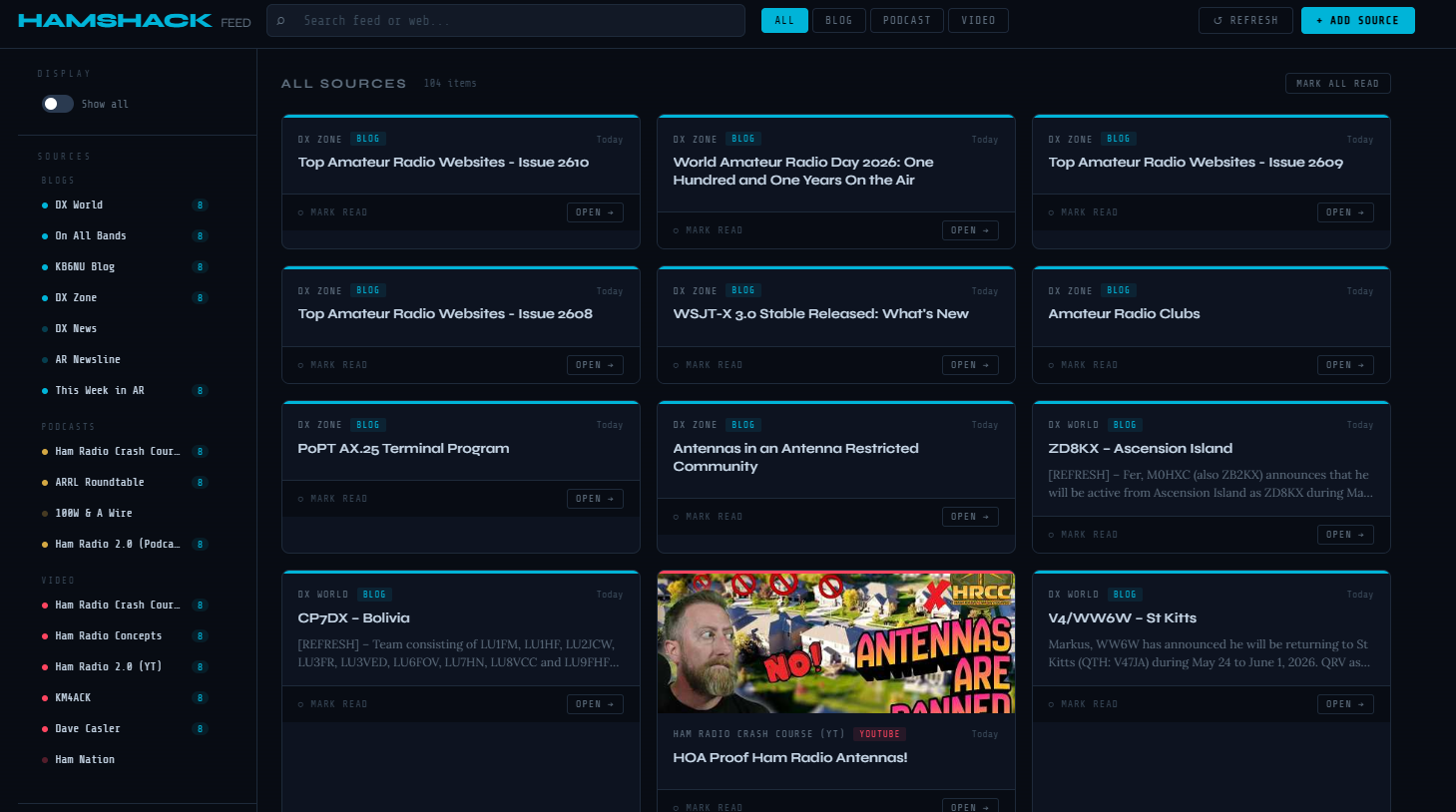
The result is HamShackFeed — a single HTML file that aggregates RSS feeds from ham radio blogs, podcasts, and YouTube channels into one clean, searchable dashboard. No installation. No server. No account. No subscription fee. Just open the file in Chrome and your content is there.
What Is RSS?
RSS (Really Simple Syndication) has been around since the early days of the internet and remains the most reliable, algorithm-free way to follow content. Almost every blog, podcast, and YouTube channel publishes an RSS feed — a structured list of their latest content that any reader can consume. There’s no feed curation, no promoted posts, no engagement-based sorting. Just the actual content from the sources you choose, in chronological order. Most people don’t know it’s there, but it’s been quietly powering podcast apps and news readers for decades.
The Sources
HamShackFeed comes pre-configured with 17 sources across three content types, all color coded — cyan for blogs, gold for podcasts, red for YouTube.
Blogs — DX World, On All Bands, KB6NU’s Ham Radio Blog, DX Zone, DX News, AR Newsline, and This Week in Amateur Radio. Between them these cover DX expedition announcements, operating tips, propagation news, technical articles, and the weekly ham radio news cycle.
Podcasts — Ham Radio Crash Course (Josh KD9FRQ), ARRL Roundtable, 100 Watts and a Wire, and Ham Radio 2.0 (Jason KC5HWB). All fetched directly via RSS — no podcast app required.
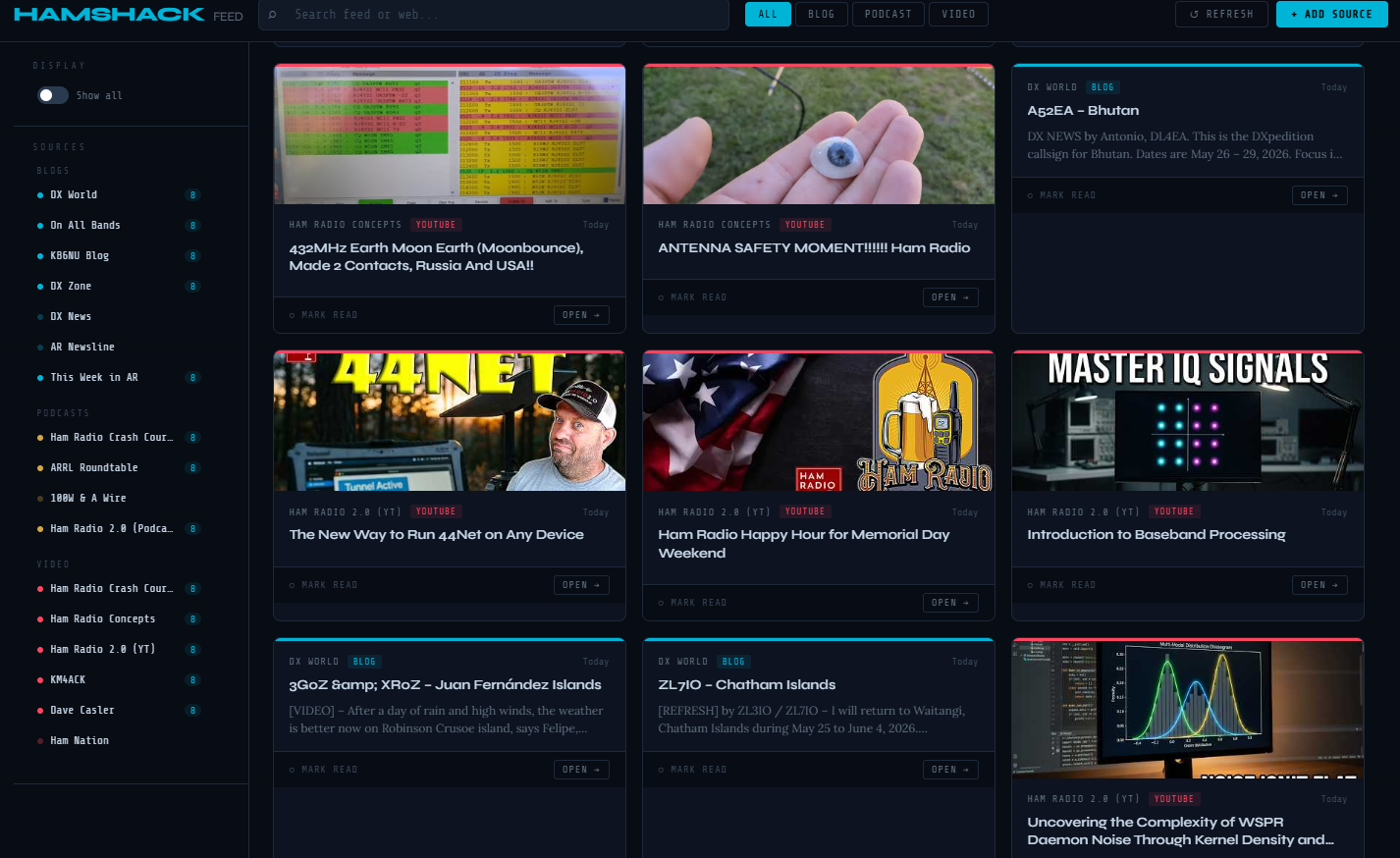
YouTube — Ham Radio Crash Course, Ham Radio Concepts, Ham Radio 2.0, KM4ACK, Dave Casler (KE0OG), and Ham Nation. YouTube publishes an RSS feed for every channel, so new video titles, descriptions, and thumbnails appear in the dashboard automatically — no YouTube API key needed.
Features
Each piece of content appears as a card showing the source, content type, publication date in human-readable form (Today, Yesterday, 3d ago), title, description excerpt, and thumbnail when available. Four filter buttons at the top — All, Blog, Podcast, Video — narrow the view instantly. The source sidebar on the left lists all sources grouped by type, each with an unread count badge, and clicking any source filters the feed to show only that source’s content.
Read tracking is built in — each card has a Mark Read button, and once marked, cards dim but stay visible. An Unread Only toggle hides everything already read so you can focus on fresh content. Mark All Read clears the queue in one click. All read state is stored in your browser’s local storage and persists between sessions.
The search bar at the top filters feed items in real time as you type. Longer queries also trigger a DuckDuckGo web search filtered to ham radio content, with results appearing below the main feed — a quick way to find content beyond what’s in your current source list.
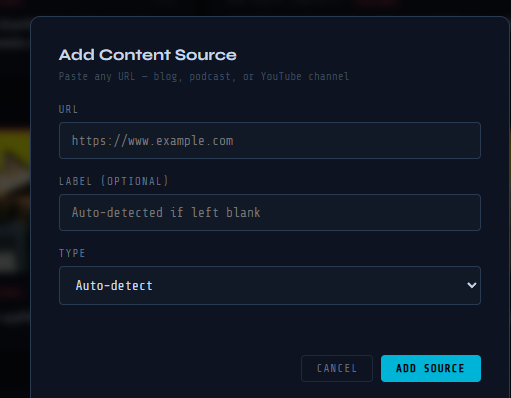
Adding a new source is straightforward — paste any blog URL, podcast URL, or YouTube channel URL into the Add Source modal and the dashboard detects the feed automatically. Paste a YouTube channel URL and it extracts the channel ID and constructs the RSS feed URL without any manual steps. Added sources persist in local storage and survive page refreshes.
How It Works
HamShackFeed is a completely self-contained HTML file. Unlike the propagation dashboard from Part 2 of this series, it doesn’t need a local Python server — it works by opening the file directly in Chrome. Feed fetching uses the free rss2json.com API, which handles the browser’s cross-origin restrictions (CORS) by fetching feeds server-side and returning them as clean JSON. All state — read items, added sources, removed sources — is stored in browser localStorage. Nothing is sent to any server except the feed fetch requests themselves.
Getting Started
Requirements: Google Chrome (or any modern browser) and an internet connection. That’s it — no Python, no PowerShell, no installation of any kind.
- Download
HamShackFeed.htmlfrom the project’s GitHub repository: github.com/N4MI73/streamdeck-hamradio - Save it anywhere on your PC —
C:\Ham Scripts\works well if you have the Stream Deck setup from the rest of this series - Open it in Chrome — double-click it in File Explorer or drag it into a Chrome window
- Feeds load automatically — give it 10–20 seconds for all sources to fetch
- Click Unread Only to focus on fresh content, use the filter buttons to narrow by type, and add or remove sources to match your interests
Bookmark the local file path in Chrome for easy access: file:///C:/Ham%20Scripts/HamShackFeed.html
Adding It to Your Stream Deck
If you’re following this series and already have a Stream Deck set up, adding HamShackFeed takes about 30 seconds. Use the Advanced Launcher plugin with Chrome as the application and the file path as the argument:
--profile-directory="Profile 1" "C:\Ham Scripts\HamShackFeed.html"A matching Stream Deck icon is available in the icons folder of the GitHub repository.
Sharing With Other Hams
Because HamShackFeed is a single self-contained file with no dependencies, sharing it is as simple as sharing any file — email it, put it on a club website, or link it from GitHub. Anyone can download and use it immediately. The default source list is pre-configured with all 17 sources, and each operator’s customizations (added sources, read state) are stored locally in their own browser — sharing the file with another ham gives them a clean slate with the default sources, not your personal configuration.
There’s also an interesting club application here. A club could maintain a version pre-configured with their own newsletter RSS feed, local repeater club news, and regional content alongside the general ham radio sources — then share it at a club meeting as a single-file download.
Closing Thoughts
The ham radio content community is larger and more active than many operators realize. HamShackFeed makes it practical to follow all of it without spending time hunting for updates. RSS is older than most social media platforms but remains the best way to follow content on your own terms — no algorithm deciding what you see, no promoted posts, just the content from the sources you choose in the order it was published.
This is version 1. Future ideas on the list include audio playback for podcasts directly in the dashboard, DXCC expedition alert integration to cross-reference DX World announcements with your most wanted list, and a mobile-friendly layout for tablet use at the operating position.
Download HamShackFeed from the project repository at github.com/N4MI73/streamdeck-hamradio.