Stream Deck for Ham Radio — Part 2: A Live Propagation Dashboard

One of the first things I do before every operating session is check propagation. What are the solar indices? Which bands are open? Are there any DX stations spotted that I want to work? Before this project, that meant opening six or seven browser tabs manually every time I sat down at the radio. Now I press one button on the Stream Deck and everything is already up and refreshing by the time the radio is warmed up.

This post covers the second major piece of the Stream Deck project — a locally-hosted propagation and operating portal that I call the N4MI Dashboard. It’s tailored specifically to my callsign, my grid square (EM83), and the way I operate.

There’s no shortage of ham radio dashboard options out there. Dedicated display apps like GeoChron Atlas Pro and HamClock are excellent — I actually run both of those on dedicated screens at my operating position. There are also several web-based dashboards with maps, propagation data, and cluster feeds. I could have used any of these as my operating portal, but what I was really looking for was a balance — enough information to make good operating decisions without the screen becoming overwhelming. Building my own meant I could include exactly what I use, organized exactly the way I want it, with my callsign and grid square baked in from the start.

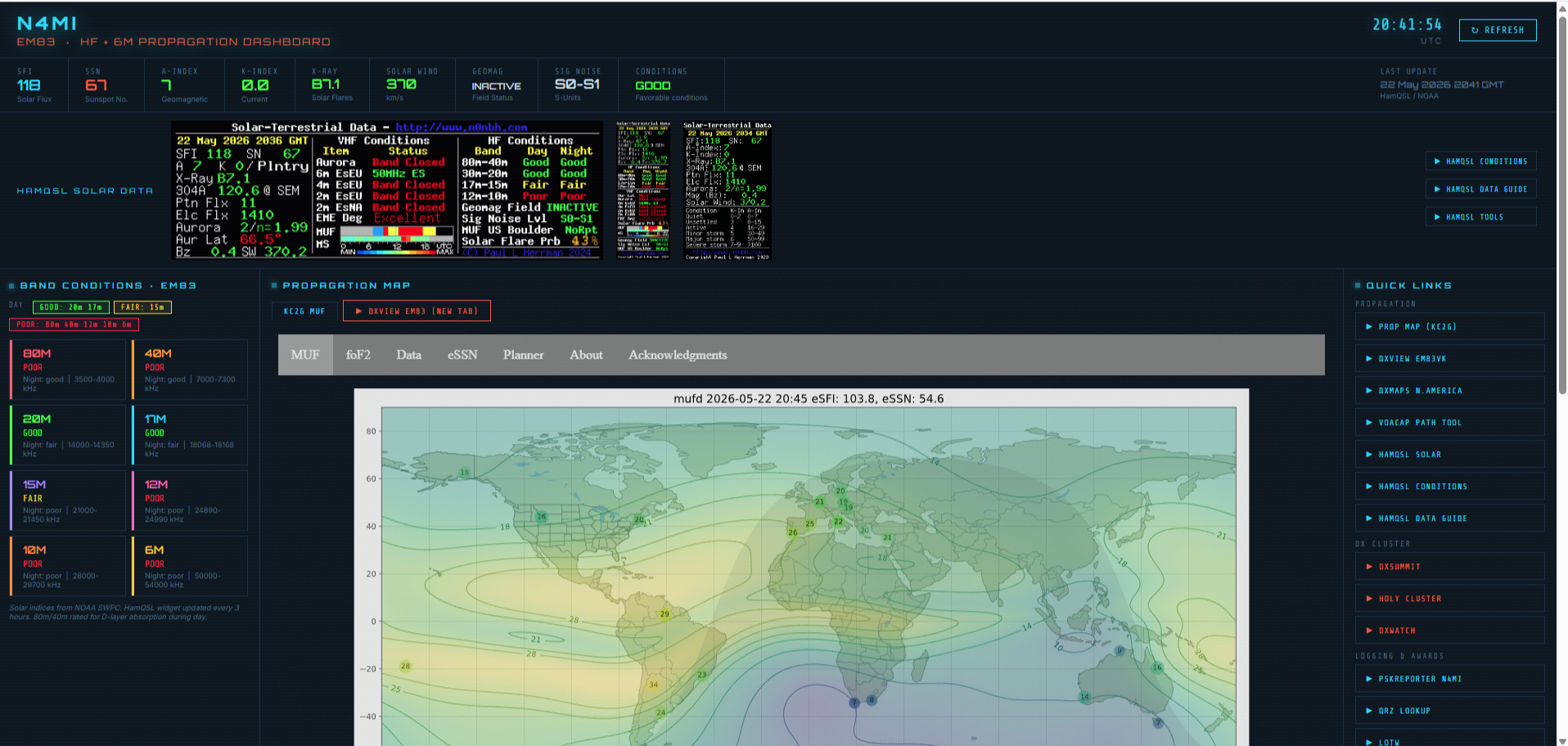
N4MI Propagation Dashboard showing solar indices, HamQSL data, band conditions panel, and KC2G MUF propagation map
The upper half of the dashboard — solar indices across the top, HamQSL widget data, band conditions for EM83, and the KC2G real-time MUF propagation map.

Why a Local Web Server?

The dashboard is an HTML file, but it can’t just be opened as a file directly from the hard drive. Browsers block cross-origin data requests from local files — a security feature called CORS. To fetch live data from external APIs like NOAA and HamQSL, the page needs to be served from a local web server instead.

The solution is a one-line Python web server. Python is already installed on most ham radio PCs, and starting the server takes a single command. A dedicated Stream Deck button runs a PowerShell script that checks whether the server is already running, starts it if it isn’t, and then opens the dashboard in Chrome — all with one press. If the server is already running from a previous session, it skips straight to opening Chrome.

What the Dashboard Shows

The dashboard is organized into several sections, each pulling live data from a different source.

Solar Indices Bar
Across the very top is a live readout of current solar conditions pulled from NOAA and HamQSL: Solar Flux Index (SFI), Sunspot Number (SSN), A-Index, K-Index, X-Ray class, Solar Wind speed, Geomagnetic field status, and an overall conditions summary. The K-Index is color coded — green for quiet, yellow for unsettled, red for active — so I can see at a glance whether geomagnetic conditions are going to affect a DX session.

HamQSL Widget Bar
Three embedded HamQSL visual widgets display HF band conditions, VHF/Aurora/Es status, and a solar data summary — updated every three hours directly from hamqsl.com.

Band Conditions Panel
This panel shows current conditions for 80m through 6m, rated Good / Fair / Poor for both day and night. One detail I was careful about here: the model accounts for D-layer absorption on 80m and 40m during daylight hours. A lot of simpler tools don’t get this right — 80m is not good in the middle of the day regardless of what the solar flux says, and the dashboard reflects that correctly. Each band also shows the expected frequency range for good propagation and what conditions will look like in the opposite period.

Propagation Map
The KC2G real-time MUF map is embedded directly in the dashboard and updates automatically. A one-click button also opens the DXView EM83VK link in a new tab — this shows actual real-time propagation based on WSPRnet, Reverse Beacon Network, and DX Cluster signals, updated every minute. Between the two, I have a very complete picture of what’s actually happening on the bands right now.

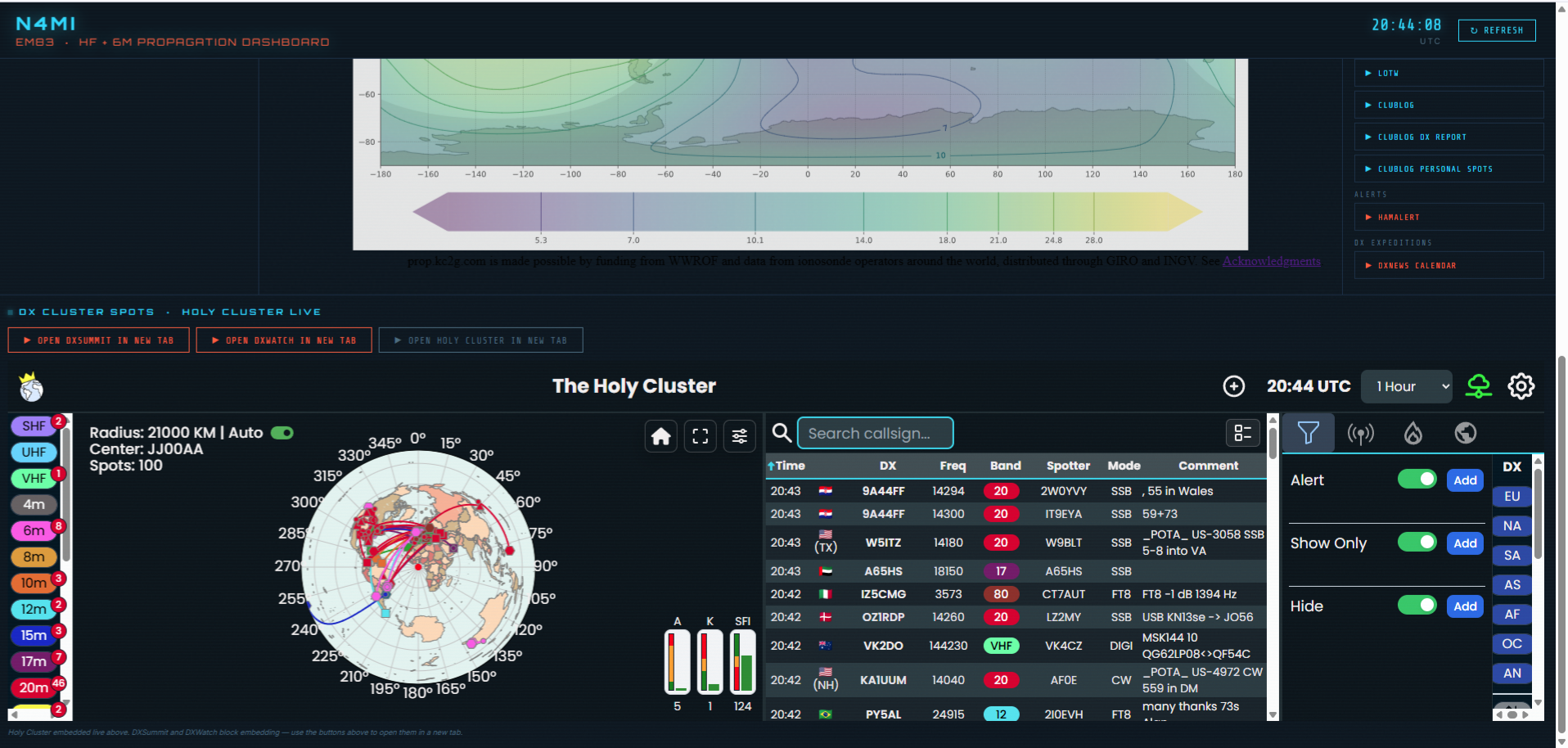
N4MI Propagation Dashboard lower half showing Holy Cluster live DX spot feed with map and spot list
The lower half of the dashboard — the Holy Cluster embedded live with a real-time spot map and filterable spot list. DXSummit and DXWatch are available as one-click new-tab buttons.

DX Cluster Spots
The Holy Cluster is embedded as a live iframe directly in the dashboard, with the full interactive map and spot list visible without leaving the page. DXSummit and DXWatch are available as one-click buttons that open in a new tab — those sites block iframe embedding due to browser security restrictions, which is a limitation of how they’re configured rather than a flaw in the dashboard.

Quick Links Panel
The right side of the dashboard has an organized set of one-click links grouped by category: Propagation, DX Cluster, Logging and Awards, DX Expeditions, and Alerts. PSKReporter is filtered directly to N4MI spots. Everything I need is one click away without hunting through bookmarks.

Storm Alert System
This feature came out of a real-world wake-up call. A popup thunderstorm with high winds and lightning arrived faster than expected one afternoon, and I realized I needed a proactive warning system built into my operating workflow — not a separate weather app I might not have open. The result is an integrated storm alert system that monitors two data sources simultaneously: my WeatherFlow Tempest personal weather station for hyperlocal lightning detection and wind data, and the NOAA National Weather Service alerts API for official watches and warnings affecting Columbia County.

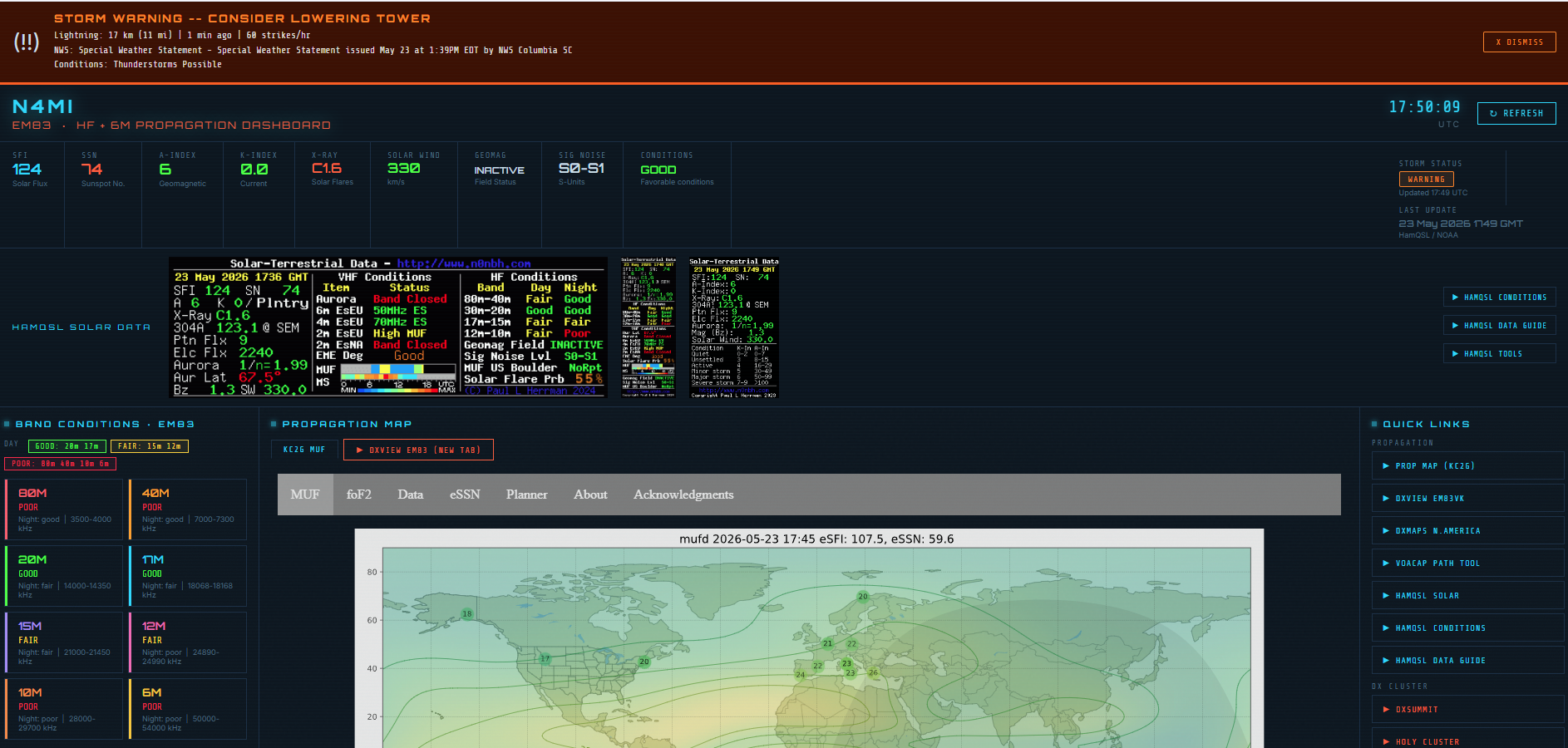
The system uses three alert levels — Caution (yellow), Warning (orange), and Critical (red, flashing) — based on lightning distance, wind speed, and NWS alert type. When an alert is active, a full-width banner appears at the very top of the dashboard regardless of scroll position, showing lightning distance in miles, time since the last strike, strikes per hour, wind gust speed, and the full NWS alert text. The Critical level triggers on a Tornado Warning or Severe Thunderstorm Warning and displays a hard-to-ignore message: SEVERE STORM WARNING — LOWER TOWER NOW!

Even when conditions are clear, a persistent Storm Status indicator in the solar indices bar shows ALL CLEAR in green so I always know the system is active and current. During testing, the system correctly triggered a WARNING when the Tempest detected lightning 9 miles away with 356 strikes per hour — well before I would have noticed anything outside. For anyone running a tower, this kind of real-time situational awareness is worth having right in your operating portal.

N4MI Propagation Dashboard showing active Storm Warning banner with lightning distance, NWS Special Weather Statement, and WARNING status pill
The storm alert system in action — a real WARNING triggered by lightning 11 miles away with an active NWS Special Weather Statement. The orange banner stays visible regardless of scroll position, and the WARNING pill appears in the solar indices bar at top right.

How It’s Built

The dashboard runs on two files stored in C:\Ham Scripts\:

  • dashboard_server.py — a Python web server that serves the HTML file and acts as a proxy for fetching HamQSL XML data and DX cluster spots via telnet, bypassing browser CORS restrictions
  • N4MI_PropagationDashboard.html — the dashboard itself, which fetches live data from NOAA and through the local Python proxy on startup and on each manual refresh

The Python server connects to US-based telnet DX cluster nodes to fetch the latest spots, parses them by band, and serves them to the dashboard as JSON. It tries three nodes in order and falls back gracefully if one is unavailable.

Claude generated both files based on my description of what I wanted the dashboard to display. The iterative process of describing a feature, seeing the result, and refining it worked very well for something this visual — I could describe exactly what I wanted each section to look like and Claude would implement it.

Adapting It for Your Station

To use this dashboard for your own station, two things need to change:

  • Update CALLSIGN = "N4MI" in dashboard_server.py to your own callsign
  • Update the callsign and grid square references in N4MI_PropagationDashboard.html — the DXView link and band conditions model both use the EM83 grid square, so those should be updated to your own grid for accurate local propagation ratings

Both files are available for download in the project’s GitHub repository: github.com/N4MI73/streamdeck-hamradio

The next post in this series covers rotator control directly from the Stream Deck — sending azimuth commands to PSTRotatorAz via UDP with one button press, including preset headings for common DX regions from EM83.

Balloon Launch with APRS & WSPR Tracker

On May 5th, I had the opportunity to participate as part of a team that launched and tracked two high-altitude balloons. This was part of an educational outreach with Savannah River Academy, a school in my community. Members from my club, the Amateur Radio Club of Columbia County (ARCCC), and two meteorologists from the National Weather Service assisted the school with the balloon launch. This was part of a series of activities with the school to teach students about radio, weather and space, in preparation for a ham radio contact later this year with an astronaut aboard the International Space Station! Savannah River Academy was one of only a handful of schools in the U.S. selected to contact the ISS through the Amateur Radio on the International Space Station (ARISS) program.

The balloon launches were covered by two local TV stations and the local newspaper:
Columbia County students launch weather balloon
Students at Savannah River Academy participate in weather balloon launch
Sky is NOT the limit: Radio club partners with Grovetown students for weather balloon launch
Weather balloon camera captures breathtaking views above CSRA

The first balloon, which carried a payload with a SPOT Trace GPS tracker and a GoPro camera, was designed climb to an altitude of 70,000 – 100, 000 feet before bursting and falling back to earth. A parachute was attached to the payload so it could return to ground intact for retrieval by a chase crew. We expected the payload to land approximately 50 miles east of the launch site, but the balloon traveled much farther than anticipated. The chase teams scrambled and the payload was successfully retrieved approximately 150 miles from the launch site. The camera captured some amazing images while the balloon was in the stratosphere. Some of the best pictures are featured in the linked news stories.

Photo captured from the high altitude weather balloon shortly after launch. This camera captured lots of amazing images during this balloon flight.
One of the many spectacular views captures by the camera on the high-altitude weather balloon.

This post focuses primarily on the second “pico” balloon, which carried only a LightAPRS-W APRS and WSPR tracker as the payload, and was designed to reach an altitude of approximately 50,000 – 60,000 feet and achieve neutral buoyancy to travel for a much longer period of time. The LightAPRS-W, which is very small, was powered by two small PowerFilm 4.8V solar panels with two 5F 3V supercapacitors. With this power source, the tracker transmits APRS on VHF at .5 to 1 Watt, and WSPR on HF at 10 mW (1/100th of a Watt!).

We spent several days configuring and testing the tracker, using the configuration and programming instructions provided by QRP Labs on GitHub, and following some helpful suggestions in the Tips & Tricks for Pico Balloons wiki. The tracker also had two light wire antennas for APRS (19.4 inches) and 20 meter WSPR (16.6 feet), and a counterpoise (16.6 feet) attached.

Assembled LightAPRS-W tracker with two PowerFilm solar panels and super capacitors. It’s really small and light!

Once assembled, the tracker was easy to configure with an Arduino IDE to load the APRS callsign (K4KNS-11), WSPR callsign (K4KNS), and a few other settings. It’s best to pay very close attention to the instructions and comments in the configuration file! After the loading the configuration, we placed the tracker in the sun to test and listen for APRS and WSPR signals. We were able to confirm that the tracker was transmitting good APRS and WSPR signals. Due to the very low power of the VHF and HF transmitters, we could only confirm local reception. With the tracker stationary and in full sunlight, we noted that the LightAPRS-W transmitted an APRS packet approximately every 5 minutes, and a WSPR signal every 4-6 minutes.

Assembled and configured LightAPRS-W in the sun to test the solar panels and monitor APRS and WSPR signals.
APRS received from the LightAPRS-W during testing.
Good test of WSPR signal from K4KNS!

It’s one thing to have a good test under controlled conditions, but quite another to achieve success under field conditions. On the day of the launch, the weather was marginal, but within acceptable parameters for a launch. We double checked to ensure the tracker was powered up and transmitting, and tied it to the balloon.

Good test of the APRS signal on launch day!

We had a good launch. The balloon, with the tracker hanging 16.6 feet below the balloon (to accommodate the counterpoise) and trailing a 16.6 foot HF antenna, quickly rose to an altitude above any potential obstructions and began its journey. Within moments, we saw the first APRS positions appear on aprs.fi. A few moments later, using the WSPR Watch iPad app, we saw that the WSPR signal was being received across the U.S.!

The first APRS track for balloon K4KNS-11!
The 10 mW WSPR signal was received as far west as Oregon!

It was all going so well! We continued to watch the balloon tracking eastward and climbing, following the same track as the high-altitude balloon that had been launched about a half hour earlier. Then, after about an hour of flight, both the APRS and WSPR signal went off the air. At that time the balloon was 55 miles east of the launch site at an altitude of 37,500 feet.

The track and final position received from K4KNS-11.
Location, speed, course, speed, altitude, temperature, pressure and solar cell voltage data from K4KNS-11 exported from aprs.fi.

We’re not sure exactly why the signals were lost, but we do not believe the balloon went down in that location. We are speculating that the tracker may have been damaged due to the high wind speeds on lost power. It is unknown how much farther the balloon might have traveled. Despite the relatively short flight, we did collect some good data for the students at Savannah River Academy to evaluate. We also proved to ourselves that we could successfully launch a balloon and track it with APRS, and that a very weak WSPR signal transmitted from high altitude could be received by stations thousands of miles away!

Map on WSPRnet.org showing stations that received the K4KNS WSPR signal on May 5, 2021.
Spot Database for K4KNS on on May 5, 2021 from WSPRnet.org.

Using aprs.fi’s data export tool, we were able to export a KMZ file with the balloon’s tracking data, and use Google Earth to view the full track and altitude changes.

Google Earth map of the track and altitude changes for pico balloon K4KNS-11 on May 5, 2021.

This was an amazing experience! We captured many lessons learned, and we intend to build another more hardened version of the tracker so we can launch another balloon and hopefully track it over a much longer distance and time.

Additional information about both balloon launches is posted to the Amateur Radio Club of Columbia County Facebook page.

A New Weather Station For My QTH

Weather is a topic that comes up frequently in ham radio QSOs. Like most other hams, I’m interested in weather. For several years, I’ve used an AcuRite personal weather station that records basic weather measurements and feeds data to Weather Underground. The WU page for my AcuRite Station is KGAGROVE14. Update: The wind direction vane on the Acurite station broke, so I took the station offline in October 2020.

Earlier this week, I received a new Tempest Weatherflow station. I supported the project on Kickstarter, and waited anxiously for several months for the team to produce and ship the product. This station uses different technology, with electronic rather than mechanical sensors for wind speed/direction and precipitation. It also has sensors for lightning detection, ambient light, solar radiation and UV. I have it mounted on top of a 15-foot push-up fiberglass mast that I got from DX engineering. Setting up the weather station and getting it online was a very easy project.

The Tempest station sends current data to a phone/tablet app and a public web page, as well as feeding the weather widget in the right menu bar of this web site. It also sends data to Weather Underground. The WU page for my Tempest station is KGAGROVE47. I am planning to leave both feeds running for a while to compare the results. I’m especially interested to compare the results for rain measurements. Update: The Weather Underground feed for the Acurite station is no longer online as of October 2020, but the Tempest station is still up!

New Tempest weather station at the back of my yard. It’s mounted about 15 feet high in an open area.
The venerable Acurite station. I’ve had it for a few years, but it’s not in a great location. The mast next to it is for my 6m antenna, and was installed after the weather station was mounted.