
I’ve had a WeatherFlow Tempest weather station running at the shack for a while now, feeding data into a few of my own projects. But it never had a public presence — no way for anyone outside my own dashboards to see what conditions look like here in Grovetown. CWOP (the Citizen Weather Observer Program) and APRS solve that: report your station’s conditions, and it shows up on APRS.fi and in the CWOP network alongside thousands of other stations, hams and non-hams alike, all over the world.
This post walks through how I got my Tempest onto CWOP/APRS-IS as N4MI-13, what the pieces actually do, and a few real problems I ran into along the way. I’m deliberately leaving code out of this one — there are a lot of different weather stations out there, and just as many ways to bridge them onto CWOP, so a wall of my specific config wouldn’t do most readers much good. What I’m hoping to hand you instead is the shape of the problem: the pieces involved, the decisions worth making deliberately, and the mistakes worth knowing about ahead of time. If you’re planning to build this with your own AI assistant’s help, this should be enough to get a real conversation started.
Why there isn’t one “correct” way to do this
Every weather station brand has its own way of talking — some publish to their own cloud service, some broadcast locally over your home network, some connect over a serial cable to a dedicated console. And there isn’t one blessed path to CWOP/APRS either: some people run dedicated hardware IGates, some use software that ships specifically for their station brand, and some — like me — bridge it themselves with general-purpose weather station software. None of these is “the” right answer. The right one depends on what station you have, what’s already running on your network, and how much you want to maintain yourself.
I went with WeeWX, an open-source weather station engine that’s been around for years and supports an enormous range of hardware through community-maintained “drivers” — small pieces of glue software that translate whatever format your specific station speaks into something WeeWX understands. If WeeWX doesn’t already have a driver for your station, there’s a good chance someone in the community has written one. That’s really the whole appeal: instead of hand-rolling a translator for CWOP myself, I got to reuse a mature project that already knows how to talk to CWOP correctly, and just needed to plug my station into it.
The shape of the pipeline
Conceptually, it’s a short chain:
- My Tempest’s hub broadcasts live readings on my home network every few seconds.
- A small always-on program (WeeWX, with the right driver for my station) listens for those broadcasts, makes sense of them, and keeps a running record.
- That same program calculates a couple of values CWOP specifically requires but my station doesn’t hand over directly — most notably something called the “altimeter setting,” a sea-level-adjusted pressure reading that depends on your station’s exact elevation.
- Every ten minutes, it packages the latest reading up in the format CWOP/APRS-IS expects and sends it out over the internet.
I run this as a small Docker container on my home NAS, since that’s the one machine in the house that’s genuinely always on. That part’s a personal infrastructure choice, not a requirement — this same software runs perfectly well directly on a Raspberry Pi, a spare laptop, or almost anything that stays powered on.
What actually went sideways (and what I’d tell someone else to watch for)
None of this went in one smooth pass, and I think the bumps are more useful to share than a clean success story would be.
Check your network before you assume anything about it. My weather station’s broadcasts and my NAS looked, at a glance, like they were on two different address ranges. Turns out they weren’t — my home network’s actual subnet was wider than I assumed, and everything was on one flat network the whole time. A two-minute check with a basic network command settled it. Worth doing that check first, rather than assuming you need to reconfigure your router.
Local broadcasts and containers don’t always mix by default. Docker normally isolates a container’s network from the host machine’s, which is usually exactly what you want — except when the whole point is listening for broadcast traffic on your real home network. That took a specific networking mode, and I made a point of testing it in isolation with a throwaway container before building the real thing on top of it, so I’d know for certain it would work before investing more time.
Community drivers sometimes lag behind the software they’re plugging into. The driver for my specific station hadn’t fully kept pace with the current version of WeeWX, so its usual automatic setup step quietly didn’t do its job. Nothing was broken, exactly — it just meant configuring that piece by hand instead of trusting the installer. If you hit something similar, it’s a very normal thing to run into with actively-maintained-but-not-official community software, not a sign you did something wrong.
“Batteries included” software images aren’t always fully included. The Docker image I used was missing one small dependency my station’s driver needed for an optional feature I wasn’t even using. An easy fix once identified, but a good reminder to actually watch your service’s own logs after first startup rather than assuming a clean deploy means it’s working.
A stray leftover test container caused a real, confusing failure later — it had quietly grabbed the same network port my real service needed, from a test I’d run earlier and forgotten to clean up. Worth being disciplined about tearing down anything temporary once you’re done with it.
And yes, an actual typo caused an actual crash — a stray character where a `False` should have been. Easy to fix once I saw the exact error, but a good example of why I tested this in stages instead of going live all at once.
Test locally before you publish anything
That staged approach is probably the single most useful thing to carry over if you build something like this yourself. I ran the whole pipeline for a good while with publishing turned off — watching real data flow in, checking that the numbers made sense, comparing my station’s readings against a couple of independent sources (the National Weather Service’s nearest station, and my station’s own companion app) before I ever let a single packet go out to the internet. Once everything checked out and matched, flipping the switch to actually publish was almost anticlimactic — it worked cleanly on the very first attempt, because everything underneath it had already been proven.
Where it ended up
N4MI-13 is now live and reporting every ten minutes, fully over the internet — no radio transmission involved, which APRS.fi correctly shows in how the station’s reports are marked. You can find it on APRS.fi like any other station.
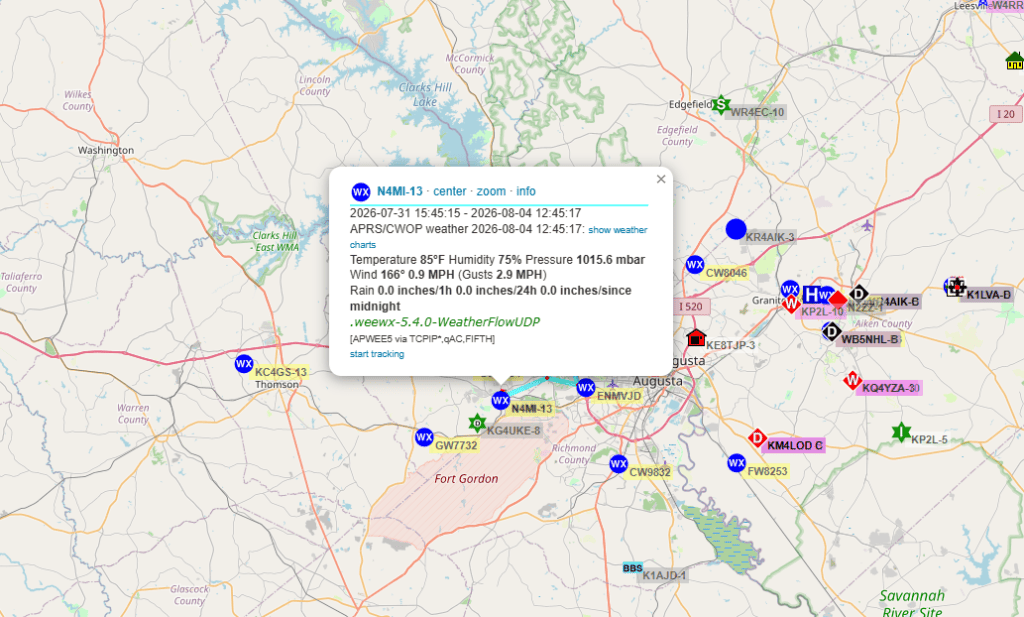
I also added a monitor afterward that watches the uploader’s health directly, and separately, a completely different project of mine that already listens to APRS traffic near home will soon flag me if N4MI-13 ever goes quiet for too long — a nice example of two unrelated projects ending up able to keep an eye on each other.
If you want to try this yourself
If you’re thinking about doing something similar — whether with WeeWX or something else entirely — here’s roughly what you’ll want to have answers to before you start, and honestly, a good enough starting point to describe to your own AI assistant if you want help working through it:
- What weather station or console do you have, and does it talk over your local network, a serial/USB connection, or only through its own cloud service?
- What existing software already knows how to talk to your specific station — and does it also know how to talk to CWOP/APRS-IS, or will you need something extra for that part?
- Where will this run, and is that device genuinely always on?
- Do you actually understand your home network’s layout, or are you assuming things about it that are worth double-checking first?
- Do you have a way to test the whole pipeline locally, with nothing actually being published, before you turn on the real upload?
- What’s your callsign-plus-SSID going to be, and do you have your APRS-IS passcode ready?
That’s genuinely most of it. The specific software and commands will differ depending on your hardware, but the shape of the problem — and the shape of a sensible, careful way to solve it — stays pretty much the same.
My next post will be about my APRS Monitor (APRSMon).