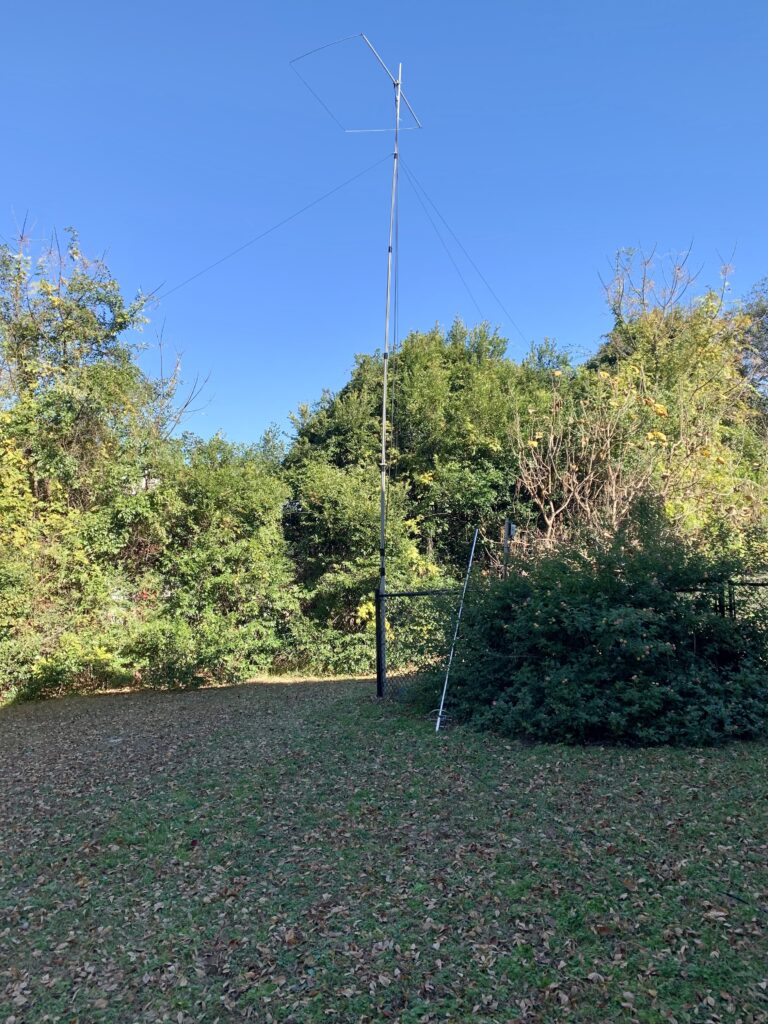
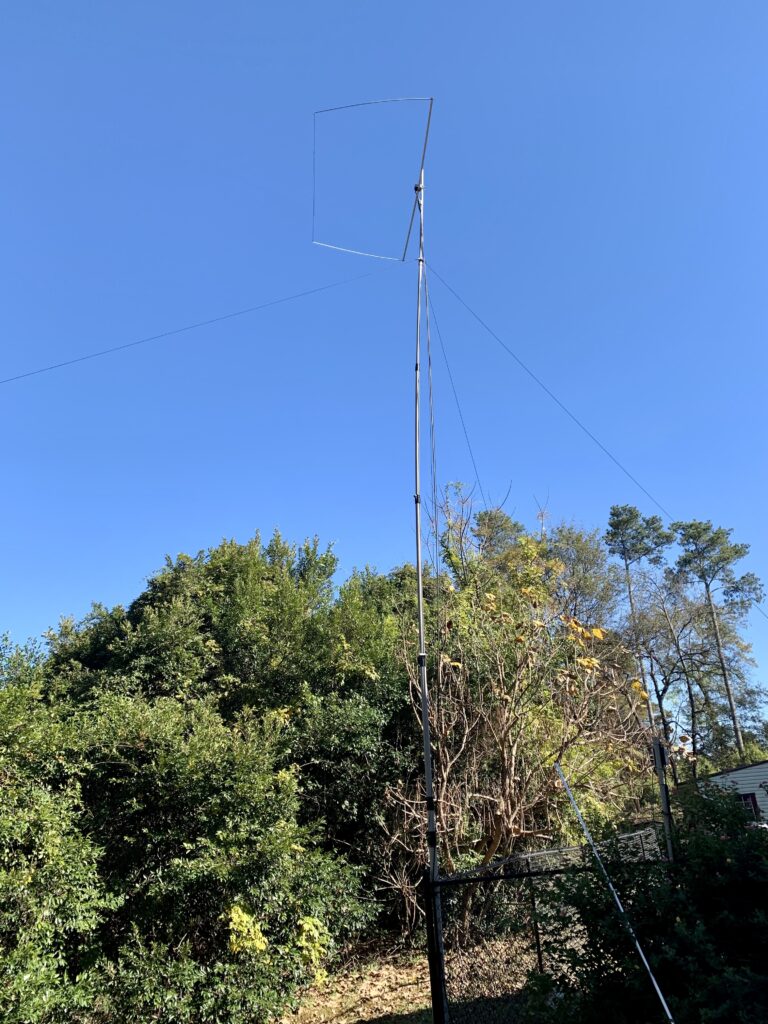
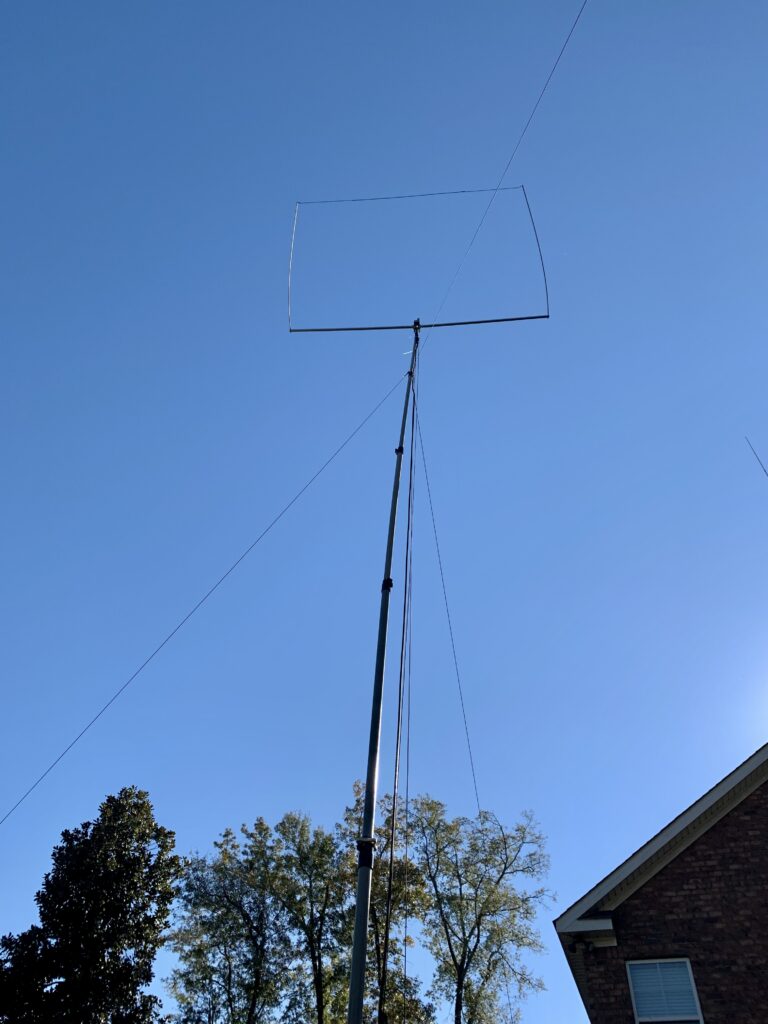
This afternoon I installed a new antenna for 10 meters. The antenna is a HF-28 Rectangle from PAR Electronics. It’s light (2.5 lbs.) and compact (approximately 8′ X 4′). It was very easy to build and took me about a half hour following the included instructions. I have the antenna mounted on a Max-Gain Systems MK-6 fiberglass push-up mast. The SWR was near perfect right away, but there are instructions included to tune the antenna if necessary. According to the manufacturer, the antenna is not perfectly omni-directional, but it has a pattern that does not require a rotator.
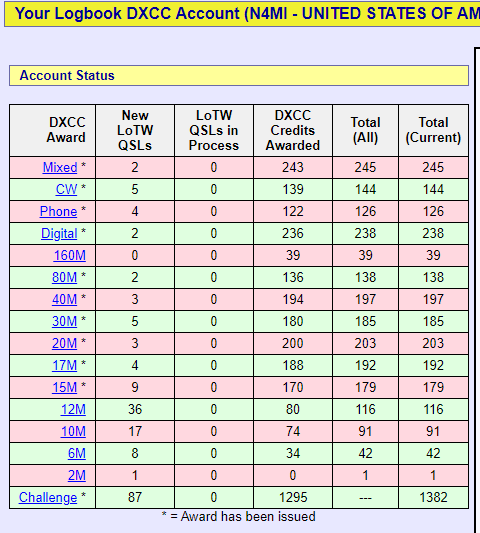
The antenna seems to work very well. The conditions on 10 meters were not great today, but right away I was able to work several FT8 stations on the west coast and in South America. I can’t wait to see how it performs in good band conditions. Hopefully this antenna will help me finally work Alaska on 10 meters to finally complete a 5BWAS and get closer 10 DXCC for 10 meters!
The antenna is mounted on the mast I had previously used for a 6 meter Ringo vertical, which you can see leaning up against the fence.I still need to do some work on the guy ropes, but the antenna and mast are very sturdy.I only need 9 more countries for DXCC on 10 meters!
This weekend the higher frequency bands have really come to life. I have had a blast working stations in Europe, the Middle East, and Africa. I hope this is just a glimpse of things to come!
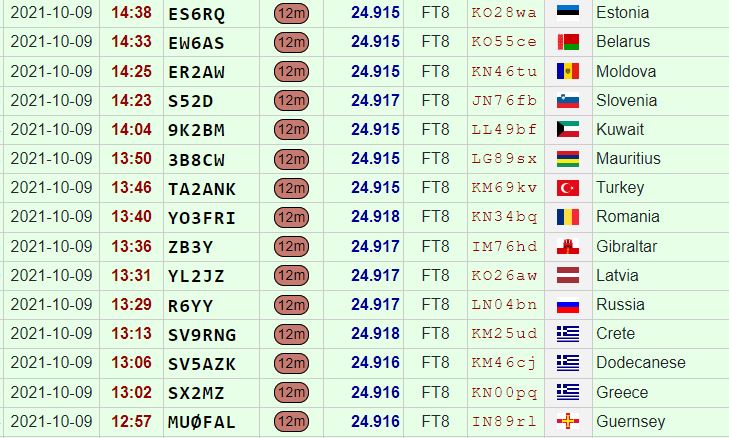
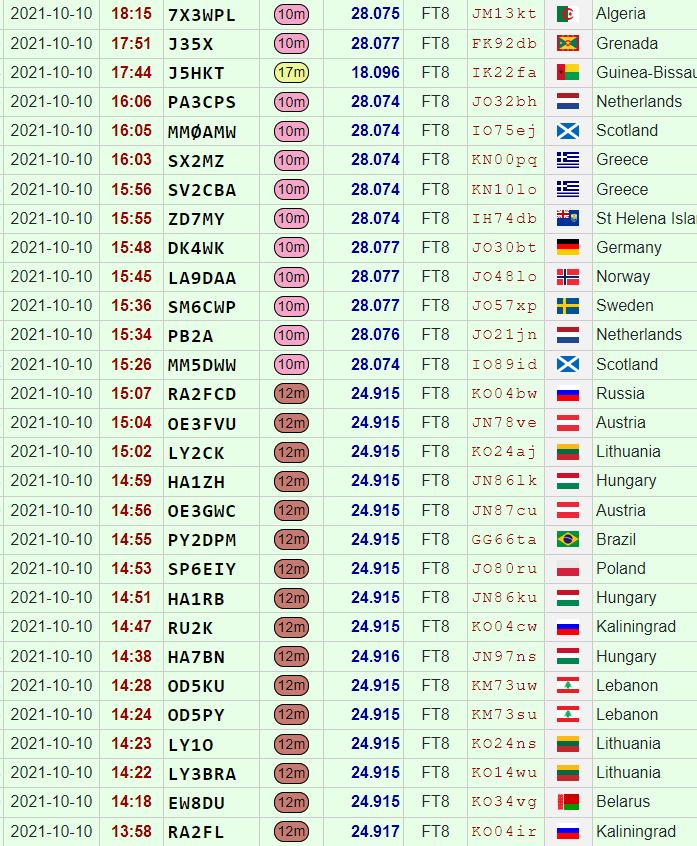
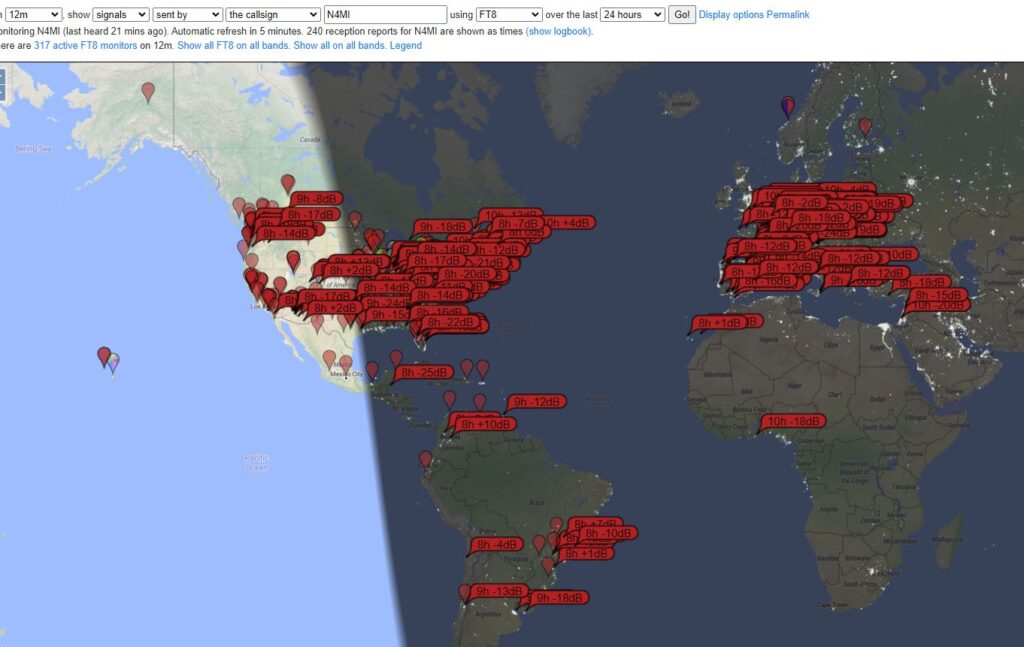
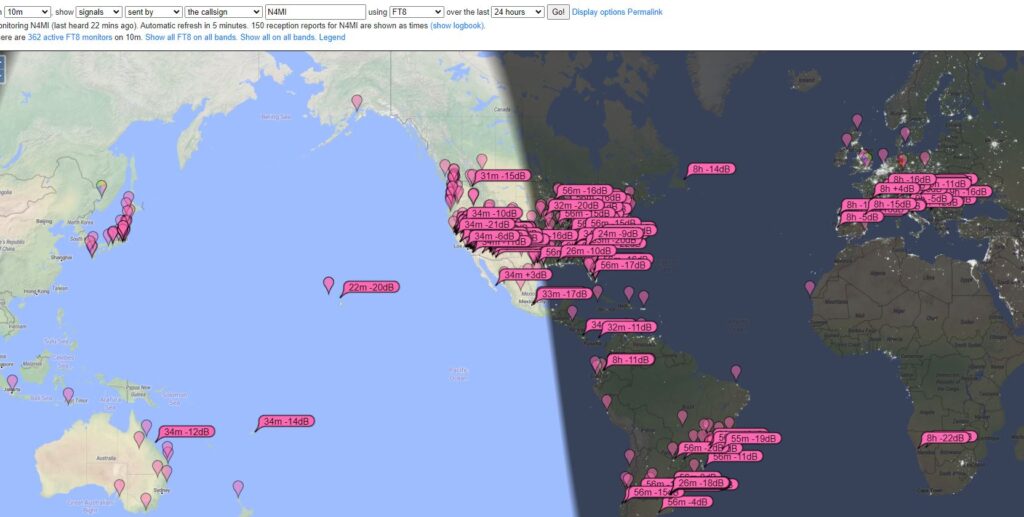
My 12m contacts on October 9th12m and 10m contacts on October 10th12m and 10m contacts on October 11thMap of stations that were receiving N4MI FT8 signals on 12m on October 11th Map of stations that were receiving N4MI FT8 signals on 10m on October 11th Logbook of the World confirmations as of October 11th
In three days, I logged 40 QSOs on 12m, in 29 different countries. I also logged 19 QSOs on 10m, in 17 different countries. I could have worked many more stations, but I was hunting specifically for new countries. I managed to work enough new countries for a DXCC Award for 12m. I still have some work to do on 10m, but I picked up a few more.
I am sure that many hams in the U.S. with better stations worked more countries, but I am happy with these results using less than 100 watts into an end-fed wire antenna.
WSPR (pronounced “whisper), which stands for “Weak Signal Propagation Reporter,” is a fantastic digital signal for assessing band conditions and evaluating antenna performance. It’s also great for detecting band openings. WSPR mode implements a protocol designed for probing potential propagation paths with low-power transmissions. The protocol was designed, and a program written initially, by Joe Taylor, K1JT. WSPR is included in the WSJT-X software, along with several other weak signal digital modes (FT8, FT4, etc.) for amateur radio. WSJT-X can be used to transmit and receive WSPR signals.
WSJT-X v.2.3.1 receiving and decoding WSPR on 20m.
There may be times when you don’t want to tie up your HF transceiver for WSPR signals, and you really don’t need the power that’s available in most HF transceivers for WSPR. With a decent antenna, you can transmit and decode signals over very long distances with very low power. Because of the encoding of the WSPR signal, a 200 mW signal has the same DX capability as a 1 KW SSB transmitter, or CW at 80W.
You can search the Internet for information on how to build your own transmitter, and there are also some kits for sale. There are also a couple of relatively inexpensive and small WSPR transmitters that are easy to configure and use. I have been using the WSPRlite Classic, made by SOTABEAMS, and two WSPR Desktop Transmitters, made by ZachTek. There are some common features between the two, but there are also quite a few differences. Both transmit a 200 mW signal using 5V (USB) input for power, and both use software for configuring your callsign, location, etc. They can also be powered from a USB power bank.
The WSPRlite and WSPR Desktop transmitter require 5V power and programming through a USB input (micro USB). Both have a SMA connector for the antenna, so a SMA male to PL-259 adapter may be useful for connecting to your antenna.
SOTABEAMS WSPRlite
The first WSPR transmitter I started using is the WSPRlite, which costs around $140. It is very small and light, and therefore great for portable operations. The unit contains internal filters for 20m and 30m, but SOTABEAMS also sells filter kits to expand the capability to include 630m, 160m, 80m, 60m, and 40m. I have not purchased or used any of the filter kits.
The WSPRlite is very small!
A unique feature from SOTABEAMS that comes with the WSPRlite is the DXplorer web site.
The WSPRlite instructions, configuration app, USB drivers, and firmware updates are available on DXplorer. Following the detailed instructions from the website, configuring the WSPRlite is a relatively easy process that involves installing USB drivers and configuration software, connecting to the computer through a USB port, selecting the appropriate COM port, entering data for a few settings, and saving the settings to the device. Once configured, the WSPRlite is ready to transmit. The trickiest part to begin transmitting is pressing a button 2 seconds after the start of an even numbered minute (i.e. 14:58:02, 10:20:02, etc.) to begin transmission. The time must be set accurately for the transmitted signals to be decoded.
Windows Device Manager will display the COM port. The WSPRlite is on COM14.The WSPRlite configuration software is very easy to understand. Enter the callsign, Maidenhed grid locator, band, desired power level (5 mW – 200 mW). There is also a link to the DXplorer site to view statistical analysis of the WSPR signals you transmit.
The configuration application also provides a link to dxplorer.net, where you can view statistics and maps depicting the WSPR signals transmitted from the WSPRlite. There are several different ways to view the data, including a metric call DX10. According to SOTABEAMS:
We use the WSPR data to generate a special metric, DX10. We recalculate your DX10 range (km) every two minutes. DX10 is a great system performance indicator. The best HF system will give the longest DX10 ranges. … Within seconds of your two-minute WSPR transmit period ending, you can see where you have been heard.
The main page for my callsign in DXplorer, with links to view maps, tables, and graphs. You can also change the band and callsign.You will probably want to view the Spots Map first, for a visual representation of where your WSPR signal is being received. It is a zoomable Great Circle map centered on your QTH. WSPR only uses the first part of your locator so your exact QTH could be some tens of kilometers from your actual location. The map shows the location of stations that have received your signal over the selected period. The colors relate to signal levels. You can “mouse-over” the spots to see additional data.The Spots Table provides more details about the stations that decoded your signal. It shows the raw WSPR data for your selected time period. This is useful as it allows you to see all the stations who spot you not just the DX10 list.The DX10 table gives you a snapshot of your system performance. However it does more as it identifies the time ranges for the spots so that you can identify the best times for DX openings. At the bottom of the table is a “DX10 mean” for your 10 spots. If there are less than 10 spots the missing ones are assumed to have a range of 0 km.For the DX10 graph, each data point is calculated from all your spots in the previous hour. The best 10 spots (in terms of range) are used to calculate a DX10 mean. The mean is displayed on a graph which is updated every 2 minutes. The DX10 graph gives a good indication of your system performance and band conditions. You can “mouse-over” the graph to see additional data.
The DXplorer website is where the WSPRlite really shines. It’s easy to use and provides lots of useful informaton.
WSPR Desktop Transmitter
The WSPR Desktop Transmitter from ZachTek also costs $140, and is slightly larger and heavier than the WSPRlite, but has several additional features. The unit includes a GPS receiver and antenna, which can automatically set the location (grid) and control the timing of the transmissions. Once initially configured, this makes operation nearly automatic. Additionally, the latest firmware and software supports Type 3 WSPR Messages. A Type 3 message can transmit a more exact location using six figure Maidenhead reports instead of the regular four figure report, which is especially useful if you use the transmitter in a mobile or portable application with it functioning as tracker.
I am using two transmitters, each designed for operation on different bands. The “Mid” model transmits on 40m, 30m, 20m and 17m. The “High” model transmits 15m, 12m, 10m and 6m.
Note: ZachTek now sells three updated models for this transmitter: – “Low” for 2190m and 630m – “Mid-Plus” for 160m, 80m, 40m, 30m, and 20m – “High-Plus” for 17m,15m, 12m, 10m and 6m You can purchase multiple units at a discount ($254 for a Mid-Plus and High Plus, or $359 for all three models).
WSPT Desktop Transmitter with the GPS antenna.
The WSPR Desktop Transmitter also uses an app for configuration. The documentation web page has links to the configuration software, a quick start guide, and lots of additional details about the transmitter. A USB driver might be required to connect to the computer, and there is a link on ZachTek’s download page. Similar to the WSPRlite, once the device connected to the computer with the micro USB cable, you can determine COM port using Windows Device Manager. You set the serial port (for my computer, COM13) on the Serial Port tab, and click open. After a moment the software will be connected to the device.
The Serial Port tab on the WSPR Transmitter Configuration application.
After the connection is open, the next tab to click is WSPR Beacon. This is where you will enter your callsign, and select the bands. With the GPS antenna connected and placed near a window, you should start seeing the GPS signal quality and a position lock. Once the position is locked, the Maidenhead grid information will fill in automatically. When initially powered up, it might take several minutes to start seeing the satellite positions and get a position lock.
Beacon configuration for the “Mid’ model, to transmit on 40m, 30m, 20m and 17m.Beacon configuration for the “High” model, to transmit on 15m, 12m, 10m, and 6m.
Once the WSPR configuration is complete, click on the Save Settings button, then click on the Boot Configuration tab. In this tab, you can configure the transmitter to start up in WSPR beacon mode. When power is applied, once it achieves a GPS position lock, the unit will automatically start transmitting WSPR beacons, cycling through the bands that were set in the WSPR Beacon tab.
The Boot Configuration tab is for setting up the transmitter to automatically obtain a GPS lock and begin transmitting WSPR when it is powered up.
There is also a Signal Generator mode so the transmitter can be used as a piece of test equipment in your shack. It can output a 23dBm sine wave from 2kHz to 50MHz, depending on model. I have not tested or used this feature.
The WSPR Desktop Transmitter includes a Signal Generator mode
The WSPR Desktop Transmitter does not include access the DXplorer website like the WSPRlite, but you could still use DXplorer standard mode to view statistics for signals transmitted from either device. You can also view maps and data for WSPR signal on the WSPRnet.org website. You can get a free account to access all of the features on WSPRnet.
The Weak Signal Propagation Reporter Network is a group of amateur radio operators using K1JT’s MEPT_JT digital mode to probe radio frequency propagation conditions using very low power (QRP/QRPp) transmissions. The software is open source, and the data collected are available to the public through this site.
http://wsprnet.org/drupal/
Front page of the WSPRnet web site
The Map tab opens a configurable map for a visual representation of where your WSPR signals are being decoded.
Map view on WSPRnet
Scroll down in the map to configure the view. There are several settings that you can use to tailor the information displayed on the map.
Map view configured to show spots for callsign N4MI on 30m over a period of 12 hours.
Click on the Database tab at the top of the web page to display a sorted list of spots. This view can also be configured.
Spots for callsign N4MI on 17mThe Database view can also be configured to filter the data and how the the details are presented.
Final Thoughts
The WSPRlite and WSPR Desktop Transmitter both performed very well. There are some difference in features and operation. For the price, the WSPR Desktop Transmitter offers a few more features and once configured it operates automatically every time it’s powered up. The WSPRlite is very small and easy to carry, and the DXplorer website offers excellent statistics for those tracking propagation conditions or comparing antennas. You can’t go wrong with either option, and your choice would depend upon your operating preferences.
Due to work obligations, I haven’t had much time to spend on the radio, or to update this blog. Since my last update, QSOs with several stations have been confirmed in Logbook of the World, allowing me to reach a achieve a couple of new awards.
I recently received a LoTW confirmation for a QSO on 6 meters that took place in July. This confirmation was number 300 on 6 meters, and an endorsement for the 50 MHz VUCC Award.
It took a while, but I finally confirmed 300 grids!Grids confirmed on 6 meters for N1ADM
Also, on November 28th, I had a FT8 QSO on 12 meters with a station in Alaska, which gave me my 50th state for the Worked All States Award on 12 meters. I still need to work Alaska on 10 meters for a 5 Band WAS, so hopefully the band conditions will continue to improve!
Alaska on 12 meters, finally! Now hoping for 10 meters!I am getting close to WAS on all HF bands!
It has been a while since I’ve found time to add a post, or to spend much time on the radio. On this Saturday morning, I decided to get up a little earlier than usual to check the band conditions for DX. I found some good DX to the west, in the Pacific and Asiatic Russia on 40 meters, as well as to the east in Europe and the Mediterranean on 15 meters. The propagation on both bands was very good, but there were lots of stations so breaking through the QRM made some contacts challenging. I only worked one new country on 15 meters, but it was lots of fun to see the variety of locations active on the bands.
I haven’t been on the radio much over the past week, but this morning I had some time and found that 20 and 30 meters were open to the Far East. It took a bunch of tries, but I was able to complete a FT8 QSO on 20 meters with VR2XRW in Hong Kong. That’s a new DXCC entity for me, and he confirmed the QSO on Logbook of the World in just a few minutes! The new DXCC entities are becoming fewer and further between, and it’s always special to work a new one!
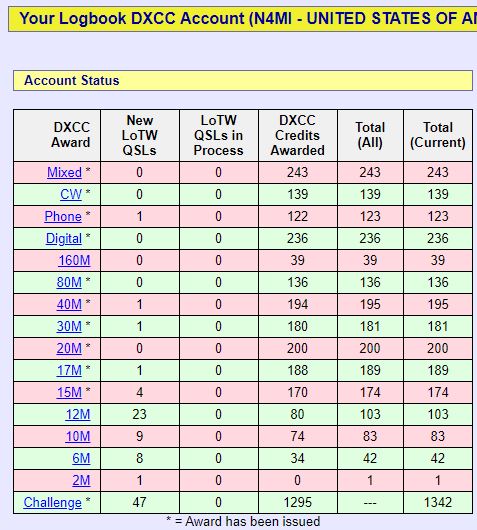
A few good FT8 and FT4 QSOs on 20 and 30 metersVR2XRW confirmed our QSO on Logtbook of the World within minutes!N1ADM’s DXCC Account Status as of August 15th, 2020
My preferred method of confirming QSOs is through ARRL’s Logbook of the World. It’s a simple, fast, and easy to use system to confirm contacts and apply for awards. It also saves a ton on postage, since international postage rates are very high. Still, there is something special about receiving a QSL card in the mail after working a rare DX station. In addition to nice keepsakes that have interesting information about the operators and their locations, they are physical proof of the QSOs.
Over the past few months, I have received several new QSL cards. Some are from contacts that took place over a year ago. I have been concentrating on getting confirmations from DX stations in the Middle East, Africa and the Pacific. I really enjoy collecting the cards, and believe they add a personal touch to what are usually very brief DX contacts.
C5FUD, Gambia; 5H3UA, Zanzibar Island; TR8CA, Gabon; V55A, Namibia; S01WS, Western Sahara; Z81D, Republic of South SudanJY5IB, Jordan; TU5PCT, Ivory Coast; VP8PJ, South Orkney Islands; E44WE, Palestine; 9J2LA, Zambia; KH0/KC0W, Mariana IslandsKH7XS, Hawaii (on 10 meters!); ZD7JC, St Helena Island; JT5DX, Mongolia; 3D2AG/P, Rotuma Island; 7V5ID, Algeria; FR5DZ, Reunion Island
Another benefit from collecting QSL cards is that sometimes the envelopes have some cool stamps!
Envelopes with cancelled stamps from Finland, Fiji, and St. Helena Island.
A few days ago I had the great fortune to work Japan on 6 meters. Today, I was fortunate again to be at the radio during a brief 6 meter opening to western Europe. I was able to complete QSOs with 5 stations – 3 in France, 1 in Guernsey, and 1 in England. The opening lasted less than an hour, and I decoded lots of other stations in western and central Europe that I was not able to work. I am very happy to get the 3 new DXCC countries and 5 new grids.
New 6m QSOs from western Europe for N1ADM on July 23rdPSKReporter map of stations that decoded N1ADM’s FT8 signals during the 1500 UTC hour on July 23rd.DXMaps 50 MHz map showing lots of hams in eastern North America and western/central Europe active during the brief 6 meter opening on July 23rd. If you look really close, you’ll see my callsign in there.
I was very fortunate to be at the radio during a very brief opening to Japan on 6 meters during the early 2300 UTC hour on July 20th. It only lasted for about 10 minutes, but the signals were fairly strong and I was able to work two stations. It was very exciting! I had one confirmed 6 meter QSO with a station in Japan back in June, but it was really nice to also get two new grids today.
I was able to log 2 stations from Japan during a very brief 6 meter opening on July 20thThis is something you don’t see very often on 6 meters in Georgia!PSKReporter map showing stations receiving N1ADM’s FT8 signals during the 2300 UTC hour on July 20th
Over the Spring and Summer I have been focused mostly on 6 meters, but I also enjoy working DX on the HF bands. I woke up really early this morning, and couldn’t get back to sleep, so I decided to check the bands. Most of the bands were dead, with lots of QRN (static) as is usually the case during the Summer. There were some strong FT8 signals on 40m, so I decided to see if there were any DX stations to work. The band was open to the west, into the Pacific, and I was able to work stations in Alaska, Hawaii, Japan, Australia, and New Caledonia. I didn’t get any new countries, but I still get a thrill from QSOs with stations on the other side of the world!
QRZ.com log of 40m FT8 QSOs during the early morning on July 7th, 2020